Guide
AI without a subscription, a practical guide to BYOK
An article billed at 10 credits, packs that melt away and prices with no link to what AI really costs. BYOK works another way, with your API key in your tools and each action at the provider's price. How it works and how to make it pay off at volume.

Anthony
Published · 19 min read

Using AI without a subscription to a credit plan means plugging your own API key into your tools and paying each action at its real price, the provider's price, with no markup on what you consume. This model has a name. It's called BYOK, short for bring your own key. You open an account with OpenAI, Anthropic or Google, generate a key and paste it into the tool that does the work for you.
The comparison that matters isn't the price of a plan but the price of an action. On many content platforms, writing an article is paid in credits, for example 10 credits worth €1.50. The same article generated with your key costs a few cents of API usage. Below are the prices recorded in October 2026, the way to get started, the security precautions and the setup that saves money at volume.
01Key takeaways
- BYOK means using your own API keys in your tools. Each action costs the AI provider's rate, with no middleman taking a margin on your usage.
- On a credit platform, an article billed at the equivalent of €1.50 costs only a few cents of API usage. The difference is the margin added to each action. It grows with your volume.
- You can get a key in a few minutes and set a spending cap as soon as you create the account.
- Your texts go straight to the AI provider you picked. No third-party server sees them pass through.
- The winning setup at volume is an unlimited-plan tool that accepts your key. The tool's cost is capped and the AI stays at cost price.
02What using AI without a subscription means
Behind the phrase sits a setup with three players. On one side there's a model provider such as OpenAI, Anthropic, Google or Mistral. On the other side there's you, with the account you open there. Between the two sits an API key, a long string of characters that identifies your account every time a tool sends a request to the model.
When a tool sells credits, it pays for the AI on your behalf and then resells each action to you with its margin. That margin is what turns cents of API usage into euros. With a key the circuit gets shorter. The tool builds the request, your key signs it, the provider answers and bills you for the exact volume processed. The full definition of BYOK fits in that shortcut, where the tool becomes the bodywork and the engine stays yours.
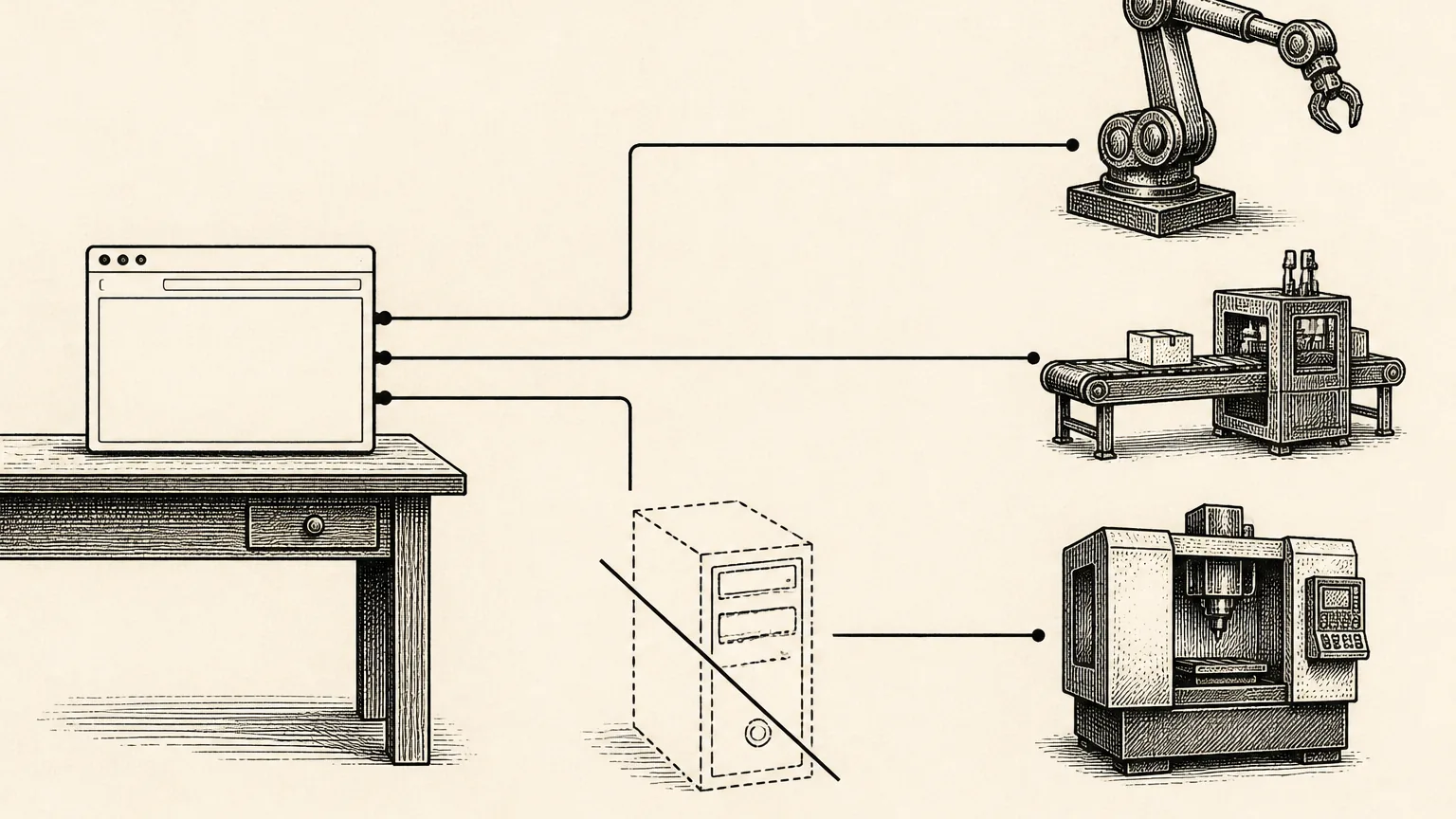
This detail shifts the balance of power. You're no longer a subscriber to a tool, since you become a direct customer of the AI provider. If a tool disappoints you, you replace it and your key comes with you. If a new model comes out, you get access the same day, without waiting for your software vendor to add it to its plan.
The term itself comes from cloud computing, where bring your own key first meant supplying your own encryption key instead of the host's. AI tools picked up the phrase with a close meaning. You bring your access to the model and the tool brings the interface and the method. That split of roles is healthy, because each party bills for what it actually produces.
03What AI really costs per use in 2026
Official price lists for subscriptions and APIs side by side
Providers bill per million tokens, the units that text is split into. A token is roughly three quarters of an English word, a little less in French. Before comparing offers, it helps to understand what a token is and what it costs, since all pay-per-use billing rests on it.
| Plan | Price per month |
|---|---|
| ChatGPT Plus (OpenAI) | $20 (about €23 incl. VAT in France) |
| Claude Pro (Anthropic) | $20 ($17 with annual billing) |
Here are the API rates from the same companies, per million tokens. With BYOK, this price list is what you pay and nothing else. Output (the generated text) costs more than input (your instructions), so both columns matter when you estimate a bill.
| Model | Input | Output |
|---|---|---|
| GPT-5.4 (OpenAI) | $2.50 | $15 |
| GPT-5.4-mini (OpenAI) | $0.75 | $4.50 |
| Claude Opus 4.8 (Anthropic) | $5 | $25 |
| Claude Sonnet 4.6 (Anthropic) | $3 | $15 |
| Claude Haiku 4.5 (Anthropic) | $1 | $5 |
| Gemini 3.6 Flash (Google), rate until December 31, 2026 | $0.75 | $3.75 |
From the rate to the cost of a real task
In concrete work, it looks like this. A 1,500-word blog post comes to about 2,500 output tokens. With GPT-5.4-mini, generating it costs a little over one cent. With Claude Sonnet 4.6, a high-end model, you stay under five cents, instructions included. Twenty articles in a month cost less than one euro with a light model. The detailed math and typical figures by profession are in the analysis of why pay-as-you-go costs less.
Now set those cents against credit billing. When a platform sells an article for 10 credits and those credits are worth €1.50, the gap with the API cost runs to dozens of times. Nothing about it is illegal or hidden, since that's their model and the margin sits on every action. At volume, though, that margin becomes the biggest line in your content budget. That's exactly what BYOK removes.

Two mechanisms soften these price lists even further. Prompt caching charges a tenth of the input rate for passages already sent, which helps as soon as your instructions repeat from one task to the next. Batch processing, for jobs that can wait a few hours, halves prices at both OpenAI and Anthropic. No consumer plan offers anything similar, because these settings belong to pay-per-use.
The tool maker Surfmind, which compared BYOK with all-inclusive AI offers, puts the savings between 40% and 90% for typical individual use. The range is wide because everything depends on volume and on the model you choose. What doesn't change is the direction of the gap as soon as you produce content regularly.
04Compatible providers, from best known to most useful
Four companies cover the vast majority of needs, each with its own character. OpenAI has the broadest catalog and the most polished console, which makes it the best documented place to start. Anthropic, the company behind Claude, is well liked for the writing quality of its models and for its prompt cache, which cuts the price of repeated input by ten.
Google plays the easy-access card. Its free tier on the Gemini API lets you try pay-per-use without a credit card, with the data caveats covered further down. Mistral, the French player, appeals to organizations that want a European partner and models that compete well on everyday tasks.
OpenRouter is a special case that comes in very handy. With a single account and a single key you reach hundreds of models from every provider. To compare models without opening four accounts or to switch from one to another depending on the task, it's the most flexible way in on the market.
05Credits, flat plan or API key and how to decide
The right answer depends on three things and no more. The first is what you pay per action today. The second is whether you need a chat interface or production tools. The third is how much volume you handle each month.
- You produce content with credit-based tools. This is the case where an API key changes everything. Each article paid in credits carries a margin on the action, while with your key the same action costs its API price, known in advance.
- Heavy chat use, all day long. A $20 chat plan makes sense here. It's a different product, unlimited conversation rather than a production line.
- Occasional production, a few tasks a week. An API key on its own is enough. You'll pay a few cents with no commitment of any kind.
A worked example makes the trade-off concrete. Take the price lists above. Twelve 1,500-word articles in a month on GPT-5.4-mini come to about 30,000 output tokens, which is roughly fifteen cents. The same output from Claude Sonnet 4.6, a high-end model, stays under 50 cents. Billed in credits at our example rate of €1.50 per article, it would cost €18. The output and the AI behind the scenes are the same. Only the way of counting changes.
To go further, the comparison puts both formulas side by side, line by line. It helps you compare a subscription and an API key based on your real profile rather than on averages, which is where most cost estimates go wrong.
06An unlimited tool plus your key, the setup that wins at volume
This reasoning deserves to be laid out once and for all. Your production cost has two parts. The first is the tool (the interface, the methods, the automation) and the second is the AI (the tokens consumed). The problem with credits is that they weld the two together, so each action bills you for the tool AND a margin on the AI. Your cost per article is fixed and your total bill follows your volume with no ceiling.
The opposite setup separates the two parts. You use a tool sold on an unlimited subscription that accepts your key, so its price is capped whatever you produce. The AI goes direct at cost price. The result is mechanical. The more you produce, the more your cost per article shrinks, since it tends toward the API cost alone. A hundred articles a month at €1.50 per action would come to €150, while with an unlimited tool plus your key the tool price stays put and the API adds a few euros.
That's the setup we chose for OpenTahr. The subscription covers the workshop and never the AI usage, which stays between you and your provider. Volume works for you instead of against you. That's the whole difference with per-action billing.
07Benefits, limits and common misconceptions
BYOK has clear strengths. The first is cost price, since nobody takes a margin on your AI usage. Freedom comes next, because the key works in every compatible tool and nobody holds you captive. Freshness completes the list, as new models reach the API before they reach the consumer plans.
It also has real limits that are better faced squarely. You need to create one account per provider and enter a credit card. Spending varies, so you need a cap to feel at ease. The quality of the experience depends on the tool you choose, since a bare key with no interface only helps developers. The article on BYOK pros and cons gathers them all and also takes apart the most stubborn misconceptions.
The most common one deserves a correction right away. Paying per use does not expose you to a crazy bill overnight. Serious providers let you set a monthly spending limit. Once it's reached, requests stop. Runaway spending is a configuration choice and never a fate you have to accept.
Another stubborn belief is that the API gives access to cut-price versions of the models. The reverse is true. The models served through the API are the same as those in consumer offers, new versions arrive there first and some fine-grained settings, such as picking the exact model or the response length, exist only there.
08Your data stays with you
The short circuit has a direct effect on privacy. With BYOK, your texts travel from your computer to the AI provider and that's the end of it. No middleman software vendor stores your instructions, your drafts or your client documents on its servers to run its plan.
On the provider side, policies differ and deserve a read. OpenAI and Anthropic don't train their models on data sent through the API by default. Google separates its two tiers, since the free Gemini API tier allows product improvement from your content while the paid tier doesn't. What this means for work under GDPR, professional secrecy included, is covered in the guide on what happens to your data with BYOK.
If you handle client data, two habits keep you safe. Read the retention policy of the provider you pick, since several offer reduced retention options on the API. Then note in your record of processing activities that content passes through that provider, along with its location. Ten minutes of rigor spare you a painful conversation the day a client asks the question.
09Get your first API key in five minutes
Creating a key follows the same path everywhere. Open an account on the provider's console. Enter a payment method or turn on the free tier where there is one. Generate the key, copy it once and paste it into your tool. Set the spending cap right away while the console is still open. Give each key a clear name from the start too, such as "writing-tool" rather than "key-2". You'll thank yourself on cleanup day.
The illustrated walkthrough to create an OpenAI API key covers the most requested provider, screen by screen. If you'd rather try first without taking out a credit card, start with the free API keys that exist. There are fewer than people claim, but they do exist. For Anthropic, Google, Mistral or OpenRouter, the guides by provider give the exact steps with screenshots.
Once you have the key, any BYOK-compatible tool accepts it as is. That's how OpenTahr works. You paste your key into a free account, it stays in your browser and the tools work with it, with no AI cost added on top.
10Keep control of the bill
Paying per use makes spending visible, request by request. That's a strength, provided you set up two habits from day one. First comes the cap, since every console lets you set a monthly budget and an email alert threshold. Then comes the right model for the right task. Keeping the high-end model for work that justifies it and handing routine jobs to a light model divides the bill without touching perceived quality.
Consoles show usage in near real time, which lets you correct course mid-month. In the first few weeks, get into the habit of opening the usage page every Friday. You quickly learn what your normal spending looks like and the surprises go away. To know what to expect for your line of work, the cost study puts figures on the real cost of pay-as-you-go AI across concrete scenarios. When volume grows, techniques such as prompt caching or batch processing help you reduce AI costs by half or more. At Anthropic, for example, an input read from the cache costs a tenth of its normal price.
11Securing your keys is the step you can't rush
An API key commits your payment method, so protect it like a password. Three rules cover the vast majority of accidents. Never publish it, whether in a code repository or in a screenshot. Hand it only to tools that keep it in the browser or encrypt it, never to a service that is vague on the subject. Revoke it at the slightest doubt, because a key regenerates in ten seconds while a leak costs you hours.
Where the key is stored matters as much as keeping it quiet. A key kept in your browser stays on your own computer. A key stored on a third party's server depends on that third party's security, its backups and its staff. Always ask a tool where your keys live and what it does with them. The answer should be clear and verifiable, otherwise move on.
The topic deserves a full guide on how to protect your API keys. It covers per-key permissions, separate keys for each use, rotation, the signs of a compromise and what to do if one happens.
12Replacing a credit-based tool with your own key
Many readers come to BYOK from a credit-based writing tool, after watching packs melt away at prices with no link to the real cost of AI. Switching is lighter than it looks. You export your content, create your key, choose a compatible tool and let the remaining credits expire. The tricky part isn't technical, since it's about finding your work habits again in the new interface.
The most requested case is documented in a Jasper alternative without a subscription, with a feature-by-feature mapping and what really changes day to day. The same reasoning carries over to most subscription writing tools, so you can apply it to whichever one you use now.
13For agencies and teams
BYOK takes on another dimension as soon as you bill clients. With one key per client, the AI usage of each account becomes its own clean cost line that you can read and pass on at actual cost. You no longer need to stack subscription seats for every team member, because spending follows the work produced and not the size of the team.
This setup calls for a bit of method about who creates the keys, where they live and how they get revoked when a contract ends. The guide to organizing client API keys offers a simple framework that holds up beyond three clients.
14When an all-inclusive plan is still the right choice
An honest guide says it plainly. BYOK doesn't win every time and the word "subscription" isn't a red flag in itself. If you chat with an AI for several hours a day, about anything, without trying to equip a production workflow, a $20 chat plan caps usage that would show up clearly at the token level. If the very idea of creating a developer account puts you off, an all-inclusive plan buys a simplicity that has real value. Some interface features, such as long-term memory or polished mobile apps, also remain tied to consumer offers.
The real red flag is per-action billing. That means a price per article, per image or per credit, far above the API cost you now know. The right move is to put your actual usage on the table before you choose. Many people keep both, with a plan for open conversation and a key for production. The two don't exclude each other, because they answer different questions.
15Where to start, step by step
If you're starting from zero, the sequence below avoids detours. Including the spending cap, it fits into one hour and leaves you with a system that runs, so you can judge the results on real numbers after a month.
- List your AI tasks for the month. Writing, rewording, audits and images all count. Note the volumes, even rough ones. This is your baseline for comparison.
- Pick a first provider based on your priorities. Documentation and catalog point to OpenAI, writing quality to Anthropic, trying without a card to Google and multi-model flexibility to OpenRouter.
- Create the key and set the cap in the same session. A low cap at first, €10 for example, can be raised in two clicks if needed.
- Connect the key to a tool that covers the tasks you listed and keep your work habits. The goal is to produce content, not to change jobs.
- Review the console after one month. Compare actual spending with your old plans, because that's where the decision to switch gets made, on your own numbers.
16Frequently asked questions
Is there a completely free API key?
Yes, with limits. Google offers a free tier on the Gemini API, capped in requests and with a trade-off, since your content may be used to improve its products. The steps to get a free Gemini API key take five minutes. At OpenAI and Anthropic, the API is paid per use with no minimum plan.
Do you need to know how to code to use an API key?
No. You copy the key and paste it into a settings field, nothing more. Code only comes in if you want to build your own programs. BYOK tools exist precisely to give you a complete interface on top of your key, so you never have to touch a line of code.
How much should you budget per month for web writing?
At October 2026 prices, a pace of twenty articles a month on a light model comes to a few dozen cents. The same volume on a high-end model stays under a few euros. Set a cap at €10. For writing work you'll stay very far from reaching it.
Can you go over budget without noticing?
Not if the cap is set. The OpenAI, Anthropic and Google consoles let you define a firm monthly limit and intermediate alerts. Once the limit is reached, requests are refused until the following month or until you lift the block yourself.
Why do credits cost so much more than the API?
Because they stack the API cost, the tool cost and the vendor's margin into one price, all of it charged on each action. The model is in no way dishonest, but it has a direct consequence. At volume, you mostly pay for the margin. Separating the tool (on a capped plan) from the AI (at cost price) sets the meter right again.
What's the difference between ChatGPT Plus and the OpenAI API?
The model is the same and the contract changes. ChatGPT Plus sells a chat interface on a flat plan, with its own usage limits. The API sells raw access to the model, billed per token, which your tools consume as they need. To produce content with tools, the API is the natural route, while for casual chatting the interface keeps its comfort.
Can you connect several providers to the same tool?
Yes. It's even one of the pleasures of BYOK, with an OpenAI key for one task and an Anthropic key for another, in the same interface. The guide to using several AI models in one place shows how to get the most from it without complicating your day.
Do providers allow this kind of use?
Yes, it's what API keys are designed for, since they exist to connect applications to the models. The terms mainly require you to keep the key under your control and to follow the provider's usage policies, the same ones that apply to consumer offers.
Transparency note. The prices quoted were recorded on October 16, 2026 from the providers' official price lists, with links below. They change regularly, so check them before any purchase decision. None of the providers mentioned pays us anything.
17Sources
- OpenAI, API price list
- Anthropic, Claude model and prompt cache pricing
- Google, Gemini API pricing and free tier
- OpenAI, ChatGPT plans
- Anthropic, Claude Pro and Max plans
- Surfmind, estimated BYOK savings
Want to try these AI models on your own questions, with your own key?
Explore the OpenTahr tools